treedata.TreeData#
- class treedata.TreeData(X=None, obs=None, var=None, uns=None, *, obsm=None, obst=None, varm=None, vart=None, layers=None, raw=None, dtype=None, shape=None, filename=None, filemode=None, asview=False, label='tree', alignment='leaves', allow_overlap=True, obsp=None, varp=None, oidx=None, vidx=None)#
AnnData with trees.
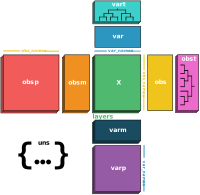
TreeDatais a light-weight wrapper aroundAnnDatawhich adds two additional attributes,obstandvart, to store trees for observations and variables. ATreeDataobject can be used just like anAnnDataobject and stores a data matrixXtogether with annotations of observationsobs(obsm,obsp,obst), variablesvar(varm,varp,vart), and unstructured annotationsuns.- Parameters:
X (
ndarray|spmatrix|sparray|DataFrame|None(default:None)) – A #observations × #variables data matrix. A view of the data is used if the data type matches, otherwise, a copy is made.obs (
DataFrame|Mapping[str,Iterable[Any]] |None(default:None)) – Key-indexed one-dimensional observations annotation of length #observations.var (
DataFrame|Mapping[str,Iterable[Any]] |None(default:None)) – Key-indexed one-dimensional variables annotation of length #variables.uns (
Mapping[str,Any] |None(default:None)) – Key-indexed unstructured annotation.obsm (
ndarray|Mapping[str,Sequence[Any]] |None(default:None)) – Key-indexed multi-dimensional observations annotation of length #observations. If passing andarray, it needs to have a structured datatype.obst (
Mapping[str,DiGraph] |None(default:None)) – Key-indexedDiGraphtrees leaf nodes in the observations axis.varm (
ndarray|Mapping[str,Sequence[Any]] |None(default:None)) – Key-indexed multi-dimensional variables annotation of length #variables. If passing andarray, it needs to have a structured datatype.vart (
Mapping[str,DiGraph] |None(default:None)) – Key-indexedDiGraphtrees leaf nodes in the variables axis.layers (
Mapping[str,ndarray|spmatrix|sparray] |None(default:None)) – Key-indexed multi-dimensional arrays aligned to dimensions ofX.dtype (
dtype|type|str|None(default:None)) –Deprecated since version The: dtype argument is deprecated and will be removed in a future version.
shape (
tuple[int,int] |None(default:None)) – Shape tuple (#observations, #variables). Can only be provided ifXisNone.filename (
PathLike|None(default:None)) – Name of backing file. Seeh5py.File.filemode (
Literal['r','r+'] |None(default:None)) – Open mode of backing file. Seeh5py.File.asview (
bool(default:False)) – Initialize as view.Xhas to be an TreeData object.label (
str|None(default:'tree')) – Columns in.obsand.varto place tree key in. Default is “tree”. If it’s None, no column is added.alignment (
Literal['leaves','nodes','subset'] (default:'leaves')) –Alignment between trees and observations/variables. One of the following:
leaves: All leaf names are present in the observation/variable names.nodes: All leaf and internal node names are present in the observation/variable names.subset: A subset of leaf and internal node names are present in the observation/variable names.
allow_overlap (
bool(default:True)) – Whether trees containing overlapping sets of leaves or nodes are allowed. Default is True.
Attributes table#
Transpose whole object
Mapping between trees and observations/variables.
Whether overlapping trees are allowed.
Change to backing mode by setting the filename of a
.h5adfile.Flag indicating whether stored trees contain overlapping nodes.
Trueif object is view of another TreeData object,Falseotherwise.Trueif object is backed on disk,Falseotherwise.Whether or not this object is a view.
Column in
.obsand .`obs` with tree keysA
propertythat creates an ephemeral AlignedMapping.Number of observations.
Number of variables/features.
One-dimensional annotation of observations (
pd.DataFrame).Names of observations (alias for
.obs.index).A
propertythat creates an ephemeral AlignedMapping.A
propertythat creates an ephemeral AlignedMapping.Tree annotation of observations
Unstructured annotation (ordered dictionary).
One-dimensional annotation of variables/ features (
pd.DataFrame).Names of variables (alias for
.var.index).A
propertythat creates an ephemeral AlignedMapping.A
propertythat creates an ephemeral AlignedMapping.Tree annotation of variables
Methods table#
chunk_X([select, replace])Return a chunk of the data matrix
Xwith random or specified indices.chunked_X([chunk_size])Return an iterator over the rows of the data matrix
X.Concatenate deprecated, use
treedata.concatinstead.copy([filename])Full copy, optionally on disk.
obs_keys()List keys of observation annotation
obs.obs_names_make_unique([join])Makes the index unique by appending a number string to each duplicate index element: '1', '2', etc.
obs_vector(k, /, *[, layer])Convenience function for returning a 1 dimensional ndarray of values from
X,layers[k], orobs.List keys of observation annotation
obsm.List keys of variable annotation
obst.rename_categories(key, categories)strings_to_categoricals([df])Transform string annotations to categoricals.
to_adata()Convert this TreeData object to an AnnData object.
to_df([layer])Generate shallow
DataFrame.to_memory([copy])Return a new AnnData object with all backed arrays loaded into memory.
Transpose whole object
uns_keys()List keys of unstructured annotation.
unwriteable(*[, store_type])Whether or not an
AnnDataobject can be written to disk for a given store type.var_keys()List keys of variable annotation
var.var_names_make_unique([join])Makes the index unique by appending a number string to each duplicate index element: '1', '2', etc.
var_vector(k, /, *[, layer])Convenience function for returning a 1 dimensional ndarray of values from
X,layers[k], orobs.List keys of variable annotation
varm.List keys of variable annotation
vart.write([filename, compression, compression_opts])Write
.h5td-formatted hdf5 file.write_csvs(dirname, *[, skip_data, sep])Write annotation to
.csvfiles.write_h5ad([filename, ...])Write
.h5ad-formatted hdf5 file.write_h5td([filename, compression, ...])Write
.h5td-formatted hdf5 file.write_loom(filename, *[, write_obsm_varm])Write
.loom-formatted hdf5 file.write_zarr(store[, chunks])Write a hierarchical Zarr array store.
Attributes#
- property T: TreeData#
Transpose whole object
Data matrix is transposed, observations and variables are interchanged. Ignores
.raw.
- property X: InMemoryArray | Dataset | Array | ZappyArray | CSRDataset | CSCDataset | None#
- property alignment: Literal['leaves', 'nodes', 'subset']#
Mapping between trees and observations/variables.
- property filename: Path | None#
Change to backing mode by setting the filename of a
.h5adfile.Setting the filename writes the stored data to disk.
Setting the filename when the filename was previously another name moves the backing file from the previous file to the new file. If you want to copy the previous file, use
copy(filename='new_filename').
- property has_overlap: bool#
Flag indicating whether stored trees contain overlapping nodes.
- Returns:
bool -
Truewhen any stored trees share nodes,Falseotherwise.
- property isview: bool#
Whether or not this object is a view.
Deprecated since version 0.7.2: Use is_view instead of isview.
- property layers: Layers | LayersView#
A
propertythat creates an ephemeral AlignedMapping.The actual data is stored as
f'_{self.name}'in the parent object.
- property obsm: AxisArrays | AxisArraysView#
A
propertythat creates an ephemeral AlignedMapping.The actual data is stored as
f'_{self.name}'in the parent object.
- property obsp: PairwiseArrays | PairwiseArraysView#
A
propertythat creates an ephemeral AlignedMapping.The actual data is stored as
f'_{self.name}'in the parent object.
- property obst: AxisTrees | AxisTreesView#
Tree annotation of observations
Stores for each key a
DiGraphwith leaf nodes inobs_names. Is subset and pruned withdatabut behaves otherwise like a alignment.
- property raw: Raw#
Store raw version of
Xandvaras.raw.Xand.raw.var.The
rawattribute is initialized with the current content of an object by setting:adata.raw = adata.copy()
Its content can be deleted:
adata.raw = None
# or
del adata.raw
Upon slicing an AnnData object along the obs (row) axis,
rawis also sliced. Slicing an AnnData object along the vars (columns) axis leavesrawunaffected. Note that you can call:adata.raw[:, 'orig_variable_name'].X
to retrieve the data associated with a variable that might have been filtered out or “compressed away” in
X.
- property uns: MutableMapping#
Unstructured annotation (ordered dictionary).
- property var: DataFrame | Dataset2D#
One-dimensional annotation of variables/ features (
pd.DataFrame).
- property varm: AxisArrays | AxisArraysView#
A
propertythat creates an ephemeral AlignedMapping.The actual data is stored as
f'_{self.name}'in the parent object.
Methods#
- chunk_X(select=1000, *, replace=True)#
Return a chunk of the data matrix
Xwith random or specified indices.
- obs_keys()#
List keys of observation annotation
obs.Deprecated since version 0.12.3: Use obs instead of obs_keys. (e.g.
k in adata.obsorstr(adata.obs.columns.tolist()))
- obs_names_make_unique(join='-')#
Makes the index unique by appending a number string to each duplicate index element: ‘1’, ‘2’, etc.
If a tentative name created by the algorithm already exists in the index, it tries the next integer in the sequence.
The first occurrence of a non-unique value is ignored.
- Parameters:
join (
str(default:'-')) – The connecting string between name and integer.- Return type:
Examples
>>> from anndata import AnnData
>>> adata = AnnData(np.ones((2, 3)), var=pd.DataFrame(index=["a", "a", "b"]))
>>> adata.var_names.astype("string")
Index(['a', 'a', 'b'], dtype='string')
>>> adata.var_names_make_unique()
>>> adata.var_names.astype("string")
Index(['a', 'a-1', 'b'], dtype='string')
- obs_vector(k, /, *, layer=None)#
Convenience function for returning a 1 dimensional ndarray of values from
X,layers[k], orobs.Deprecated since version 0.13: Use anndata.acc.A instead of obs_vector. E.g.
vec = adata[A.obs['foo']]orvec = adata[A.layers['l']['bar', :]]Made for convenience, not performance. Intentionally permissive about arguments, for easy iterative use.
- obsm_keys()#
List keys of observation annotation
obsm.Deprecated since version 0.12.3: Use obsm instead of obsm_keys. (e.g.
k in adata.obsmoradata.obsm.keys() | {'u'})
- rename_categories(key, categories)#
Rename categories of annotation
keyinobs,var, anduns.Only supports passing a list/array-like
categoriesargument.Besides calling
self.obs[key].cat.categories = categories– similar forvar- this also renames categories in unstructured annotation that uses the categorical annotationkey.
- strings_to_categoricals(df=None)#
Transform string annotations to categoricals.
Only affects string annotations that lead to less categories than the total number of observations.
- Parameters:
df (
DataFrame|None(default:None)) – IfdfisNone, modifies bothobsandvar, otherwise modifiesdfinplace.
Notes
- to_df(layer=None)#
Generate shallow
DataFrame.The data matrix
Xis returned asDataFrame, whereobs_namesinitializes the index, andvar_namesthe columns.No annotations are maintained in the returned object.
The data matrix is densified in case it is sparse.
- to_memory(copy=False)#
Return a new AnnData object with all backed arrays loaded into memory.
- Parameters:
copy (default:
False) – Whether the arrays that are already in-memory should be copied.- Return type:
- transpose()#
Transpose whole object
Data matrix is transposed, observations and variables are interchanged. Ignores
.raw.- Return type:
- uns_keys()#
List keys of unstructured annotation.
Deprecated since version 0.13: Use uns instead of uns_keys. (e.g.
k in adata.unsorsorted(adata.uns))
- unwriteable(*, store_type=None)#
Whether or not an
AnnDataobject can be written to disk for a given store type.- Parameters:
store_type (
Literal['h5','zarr'] |None(default:None)) – Which backing store -Noneindicates that it can be writeable to either.- Return type:
- Returns:
Whether or not this object is writeable. While the return type may change to include richer output about which elements cannot be written, this new type’s evaluation as a boolean will not change from the current behavior i.e.,
bool(adata.unwriteable())will always evaluate the same.
- var_keys()#
List keys of variable annotation
var.Deprecated since version 0.12.3: Use var instead of var_keys. (e.g.
k in adata.varorstr(adata.var.columns.tolist()))
- var_names_make_unique(join='-')#
Makes the index unique by appending a number string to each duplicate index element: ‘1’, ‘2’, etc.
If a tentative name created by the algorithm already exists in the index, it tries the next integer in the sequence.
The first occurrence of a non-unique value is ignored.
- Parameters:
join (
str(default:'-')) – The connecting string between name and integer.- Return type:
Examples
>>> from anndata import AnnData
>>> adata = AnnData(np.ones((2, 3)), var=pd.DataFrame(index=["a", "a", "b"]))
>>> adata.var_names.astype("string")
Index(['a', 'a', 'b'], dtype='string')
>>> adata.var_names_make_unique()
>>> adata.var_names.astype("string")
Index(['a', 'a-1', 'b'], dtype='string')
- var_vector(k, /, *, layer=None)#
Convenience function for returning a 1 dimensional ndarray of values from
X,layers[k], orobs.Deprecated since version 0.13: Use anndata.acc.A instead of var_vector. E.g.
vec = adata[A.var['foo']]orvec = adata[A.layers['l'][:, 'bar']]Made for convenience, not performance. Intentionally permissive about arguments, for easy iterative use.
- varm_keys()#
List keys of variable annotation
varm.Deprecated since version 0.12.3: Use varm instead of varm_keys. (e.g.
k in adata.varmoradata.varm.keys() | {'u'})
- write(filename=None, compression=None, compression_opts=None, **kwargs)#
Write
.h5td-formatted hdf5 file.- Parameters:
filename (
PathLike|None(default:None)) – Filename of data file. Defaults to backing file.compression (
Literal['gzip','lzf'] |None(default:None)) – [lzf,gzip], see the h5py Filter pipeline.compression_opts (
int|Any(default:None)) – [lzf,gzip], see the h5py Filter pipeline.
- write_csvs(dirname, *, skip_data=True, sep=',')#
Write annotation to
.csvfiles.It is not possible to recover the full
AnnDatafrom these files. Usewrite()for this.
- write_h5ad(filename=None, *, convert_strings_to_categoricals=True, compression=None, compression_opts=None, as_dense=())#
Write
.h5ad-formatted hdf5 file.Note
Setting compression to
'gzip'can save disk space but will slow down writing and subsequent reading. Prior to v0.6.16, this was the default for parametercompression.Generally, if you have sparse data that are stored as a dense matrix, you can dramatically improve performance and reduce disk space by converting to a
csr_matrix:from scipy.sparse import csr_matrix adata.X = csr_matrix(adata.X)
- Parameters:
filename (
PathLike[str] |str|None(default:None)) – Filename of data file. Defaults to backing file.convert_strings_to_categoricals (
bool(default:True)) – Convert string columns to categorical.compression (
Literal['gzip','lzf'] |None(default:None)) –For [
lzf,gzip], see the h5py Filter pipeline.Alternative compression filters such as
zstdcan be passed from the hdf5plugin library. Experimental.Usage example:
import hdf5plugin
adata.write_h5ad(
    filename,
    compression=hdf5plugin.FILTERS["zstd"]
)
Note
Datasets written with hdf5plugin-provided compressors cannot be opened without first loading the hdf5plugin library using
import hdf5plugin. When using alternative compression filters such aszstd, consider writing tozarrformat instead ofh5ad, as thezarrlibrary provides a more transparent compression pipeline.compression_opts (
int|Any(default:None)) –For [
lzf,gzip], see the h5py Filter pipeline.Alternative compression filters such as
zstdcan be configured using helpers from the hdf5plugin library. Experimental.Usage example (setting
zstdcompression level to 5):import hdf5plugin adata.write_h5ad( filename, compression=hdf5plugin.FILTERS["zstd"], compression_opts=hdf5plugin.Zstd(clevel=5).filter_options )
as_dense (
Sequence[str] (default:())) – Sparse arrays in AnnData object to write as dense. Currently only supportsXandraw/X.
- write_h5td(filename=None, compression=None, compression_opts=None, **kwargs)#
Write
.h5td-formatted hdf5 file.- Parameters:
filename (
PathLike|None(default:None)) – Filename of data file. Defaults to backing file.compression (
Literal['gzip','lzf'] |None(default:None)) – [lzf,gzip], see the h5py Filter pipeline.compression_opts (
int|Any(default:None)) – [lzf,gzip], see the h5py Filter pipeline.
- write_loom(filename, *, write_obsm_varm=False)#
Write
.loom-formatted hdf5 file.Deprecated since version 0.13: Deprecated in favor of other formats, e.g.
write_h5ad. Loom isn’t well-maintained and supports only a subset of anndata features.
- write_zarr(store, chunks=None, **kwargs)#
Write a hierarchical Zarr array store.
- Parameters:
store (
MutableMapping|PathLike) – The filename, aMutableMapping, or a Zarr storage class.chunks (
tuple[int,...] |None(default:None)) – Chunk shape.
- chunk_X(select=1000, *, replace=True)#
Return a chunk of the data matrix
Xwith random or specified indices.
- obs_keys()#
List keys of observation annotation
obs.Deprecated since version 0.12.3: Use obs instead of obs_keys. (e.g.
k in adata.obsorstr(adata.obs.columns.tolist()))
- obs_names_make_unique(join='-')#
Makes the index unique by appending a number string to each duplicate index element: ‘1’, ‘2’, etc.
If a tentative name created by the algorithm already exists in the index, it tries the next integer in the sequence.
The first occurrence of a non-unique value is ignored.
- Parameters:
join (
str(default:'-')) – The connecting string between name and integer.- Return type:
Examples
>>> from anndata import AnnData
>>> adata = AnnData(np.ones((2, 3)), var=pd.DataFrame(index=["a", "a", "b"]))
>>> adata.var_names.astype("string")
Index(['a', 'a', 'b'], dtype='string')
>>> adata.var_names_make_unique()
>>> adata.var_names.astype("string")
Index(['a', 'a-1', 'b'], dtype='string')
- obs_vector(k, /, *, layer=None)#
Convenience function for returning a 1 dimensional ndarray of values from
X,layers[k], orobs.Deprecated since version 0.13: Use anndata.acc.A instead of obs_vector. E.g.
vec = adata[A.obs['foo']]orvec = adata[A.layers['l']['bar', :]]Made for convenience, not performance. Intentionally permissive about arguments, for easy iterative use.
- obsm_keys()#
List keys of observation annotation
obsm.Deprecated since version 0.12.3: Use obsm instead of obsm_keys. (e.g.
k in adata.obsmoradata.obsm.keys() | {'u'})
- rename_categories(key, categories)#
Rename categories of annotation
keyinobs,var, anduns.Only supports passing a list/array-like
categoriesargument.Besides calling
self.obs[key].cat.categories = categories– similar forvar- this also renames categories in unstructured annotation that uses the categorical annotationkey.
- strings_to_categoricals(df=None)#
Transform string annotations to categoricals.
Only affects string annotations that lead to less categories than the total number of observations.
- Parameters:
df (
DataFrame|None(default:None)) – IfdfisNone, modifies bothobsandvar, otherwise modifiesdfinplace.
Notes
- to_df(layer=None)#
Generate shallow
DataFrame.The data matrix
Xis returned asDataFrame, whereobs_namesinitializes the index, andvar_namesthe columns.No annotations are maintained in the returned object.
The data matrix is densified in case it is sparse.
- to_memory(copy=False)#
Return a new AnnData object with all backed arrays loaded into memory.
- Parameters:
copy (default:
False) – Whether the arrays that are already in-memory should be copied.- Return type:
- transpose()#
Transpose whole object
Data matrix is transposed, observations and variables are interchanged. Ignores
.raw.- Return type:
- uns_keys()#
List keys of unstructured annotation.
Deprecated since version 0.13: Use uns instead of uns_keys. (e.g.
k in adata.unsorsorted(adata.uns))
- unwriteable(*, store_type=None)#
Whether or not an
AnnDataobject can be written to disk for a given store type.- Parameters:
store_type (
Literal['h5','zarr'] |None(default:None)) – Which backing store -Noneindicates that it can be writeable to either.- Return type:
- Returns:
Whether or not this object is writeable. While the return type may change to include richer output about which elements cannot be written, this new type’s evaluation as a boolean will not change from the current behavior i.e.,
bool(adata.unwriteable())will always evaluate the same.
- var_keys()#
List keys of variable annotation
var.Deprecated since version 0.12.3: Use var instead of var_keys. (e.g.
k in adata.varorstr(adata.var.columns.tolist()))
- var_names_make_unique(join='-')#
Makes the index unique by appending a number string to each duplicate index element: ‘1’, ‘2’, etc.
If a tentative name created by the algorithm already exists in the index, it tries the next integer in the sequence.
The first occurrence of a non-unique value is ignored.
- Parameters:
join (
str(default:'-')) – The connecting string between name and integer.- Return type:
Examples
>>> from anndata import AnnData
>>> adata = AnnData(np.ones((2, 3)), var=pd.DataFrame(index=["a", "a", "b"]))
>>> adata.var_names.astype("string")
Index(['a', 'a', 'b'], dtype='string')
>>> adata.var_names_make_unique()
>>> adata.var_names.astype("string")
Index(['a', 'a-1', 'b'], dtype='string')
- var_vector(k, /, *, layer=None)#
Convenience function for returning a 1 dimensional ndarray of values from
X,layers[k], orobs.Deprecated since version 0.13: Use anndata.acc.A instead of var_vector. E.g.
vec = adata[A.var['foo']]orvec = adata[A.layers['l'][:, 'bar']]Made for convenience, not performance. Intentionally permissive about arguments, for easy iterative use.
- varm_keys()#
List keys of variable annotation
varm.Deprecated since version 0.12.3: Use varm instead of varm_keys. (e.g.
k in adata.varmoradata.varm.keys() | {'u'})
- write(filename=None, compression=None, compression_opts=None, **kwargs)#
Write
.h5td-formatted hdf5 file.- Parameters:
filename (
PathLike|None(default:None)) – Filename of data file. Defaults to backing file.compression (
Literal['gzip','lzf'] |None(default:None)) – [lzf,gzip], see the h5py Filter pipeline.compression_opts (
int|Any(default:None)) – [lzf,gzip], see the h5py Filter pipeline.
- write_csvs(dirname, *, skip_data=True, sep=',')#
Write annotation to
.csvfiles.It is not possible to recover the full
AnnDatafrom these files. Usewrite()for this.
- write_h5ad(filename=None, *, convert_strings_to_categoricals=True, compression=None, compression_opts=None, as_dense=())#
Write
.h5ad-formatted hdf5 file.Note
Setting compression to
'gzip'can save disk space but will slow down writing and subsequent reading. Prior to v0.6.16, this was the default for parametercompression.Generally, if you have sparse data that are stored as a dense matrix, you can dramatically improve performance and reduce disk space by converting to a
csr_matrix:from scipy.sparse import csr_matrix adata.X = csr_matrix(adata.X)
- Parameters:
filename (
PathLike[str] |str|None(default:None)) – Filename of data file. Defaults to backing file.convert_strings_to_categoricals (
bool(default:True)) – Convert string columns to categorical.compression (
Literal['gzip','lzf'] |None(default:None)) –For [
lzf,gzip], see the h5py Filter pipeline.Alternative compression filters such as
zstdcan be passed from the hdf5plugin library. Experimental.Usage example:
import hdf5plugin
adata.write_h5ad(
    filename,
    compression=hdf5plugin.FILTERS["zstd"]
)
Note
Datasets written with hdf5plugin-provided compressors cannot be opened without first loading the hdf5plugin library using
import hdf5plugin. When using alternative compression filters such aszstd, consider writing tozarrformat instead ofh5ad, as thezarrlibrary provides a more transparent compression pipeline.compression_opts (
int|Any(default:None)) –For [
lzf,gzip], see the h5py Filter pipeline.Alternative compression filters such as
zstdcan be configured using helpers from the hdf5plugin library. Experimental.Usage example (setting
zstdcompression level to 5):import hdf5plugin adata.write_h5ad( filename, compression=hdf5plugin.FILTERS["zstd"], compression_opts=hdf5plugin.Zstd(clevel=5).filter_options )
as_dense (
Sequence[str] (default:())) – Sparse arrays in AnnData object to write as dense. Currently only supportsXandraw/X.
- write_h5td(filename=None, compression=None, compression_opts=None, **kwargs)#
Write
.h5td-formatted hdf5 file.- Parameters:
filename (
PathLike|None(default:None)) – Filename of data file. Defaults to backing file.compression (
Literal['gzip','lzf'] |None(default:None)) – [lzf,gzip], see the h5py Filter pipeline.compression_opts (
int|Any(default:None)) – [lzf,gzip], see the h5py Filter pipeline.
- write_loom(filename, *, write_obsm_varm=False)#
Write
.loom-formatted hdf5 file.Deprecated since version 0.13: Deprecated in favor of other formats, e.g.
write_h5ad. Loom isn’t well-maintained and supports only a subset of anndata features.
- write_zarr(store, chunks=None, **kwargs)#
Write a hierarchical Zarr array store.
- Parameters:
store (
MutableMapping|PathLike) – The filename, aMutableMapping, or a Zarr storage class.chunks (
tuple[int,...] |None(default:None)) – Chunk shape.
- property T: TreeData#
Transpose whole object
Data matrix is transposed, observations and variables are interchanged. Ignores
.raw.
- property alignment: Literal['leaves', 'nodes', 'subset']#
Mapping between trees and observations/variables.
- property filename: Path | None#
Change to backing mode by setting the filename of a
.h5adfile.Setting the filename writes the stored data to disk.
Setting the filename when the filename was previously another name moves the backing file from the previous file to the new file. If you want to copy the previous file, use
copy(filename='new_filename').
- property has_overlap: bool#
Flag indicating whether stored trees contain overlapping nodes.
- Returns:
bool -
Truewhen any stored trees share nodes,Falseotherwise.
- property isview: bool#
Whether or not this object is a view.
Deprecated since version 0.7.2: Use is_view instead of isview.
- property obst: AxisTrees | AxisTreesView#
Tree annotation of observations
Stores for each key a
DiGraphwith leaf nodes inobs_names. Is subset and pruned withdatabut behaves otherwise like a alignment.
- property raw: Raw#
Store raw version of
Xandvaras.raw.Xand.raw.var.The
rawattribute is initialized with the current content of an object by setting:adata.raw = adata.copy()
Its content can be deleted:
adata.raw = None
# or
del adata.raw
Upon slicing an AnnData object along the obs (row) axis,
rawis also sliced. Slicing an AnnData object along the vars (columns) axis leavesrawunaffected. Note that you can call:adata.raw[:, 'orig_variable_name'].X
to retrieve the data associated with a variable that might have been filtered out or “compressed away” in
X.
- property uns: MutableMapping#
Unstructured annotation (ordered dictionary).